Frequently Asked Questions
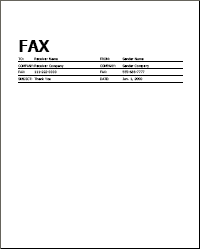
Q: How does your free fax cover page look like?
A: Our free fax cover page looks like this:
Q: Do you add Ads to my fax?
A: NO. We do NOT add any Ads to your fax (neither free fax nor premium fax).
Q: Do you add word "GotFreeFax.com" or GotFreeFax.com logo to my fax?
A: NO. We do NOT add our logo or brand to your fax (neither free fax nor premium fax).
Q: Can I use my own fax cover page?
A: Yes. Our no-ad free fax cover page is optional. If you prefer to use your own fax cover page or not to use our fax cover page, you can always uncheck the "Use No Ad Free Cover Page" option in the Fax Content area.
Q: How can create a customized fax cover sheet?
A: You can use our Fax Cover Sheet Generator to easily create a fax cover sheet with your preferred template. Simply enter the sender and receiver details, add your desired message, and download your fully prepared fax cover sheet in either PDF or Word format.
Q: How can I send multiple pages in a single fax?
A: You can have multiple pages in a single PDF or MS Word file. When you upload multi-page PDF or MS Word files to fax, all pages will be sent in one fax.
Secondly, our online fax form supports up to 10 upload files per fax. For instance, you can upload 10 JPEG images to fax at once. If you have more than 10 JPEG image files to fax, you can insert them into a MS Word file and then upload the Word file to fax.
Please note that the combined file size of all upload files (i.e. PDF, DOC, JPG files) must not exceed 30 MB. You can reduce file size by scanning your document in black-white mode at a resolution of 300 DPI.
A: You can have multiple pages in a single PDF or MS Word file. When you upload multi-page PDF or MS Word files to fax, all pages will be sent in one fax.
Secondly, our online fax form supports up to 10 upload files per fax. For instance, you can upload 10 JPEG images to fax at once. If you have more than 10 JPEG image files to fax, you can insert them into a MS Word file and then upload the Word file to fax.
Please note that the combined file size of all upload files (i.e. PDF, DOC, JPG files) must not exceed 30 MB. You can reduce file size by scanning your document in black-white mode at a resolution of 300 DPI.
Q: Do you support fax to international or off-shore destinations?
A: GotFreeFax.com free fax service and US/Canada premium service support sending faxes to the US Continental 48 states, Alaska, Hawaii, and Canada only (off-shore and other international destinations are not supported).
GotFreeFax.com international fax service supports sending faxes to over 200 countries and regions.
Q: Does fax number need to be entered in a certain format? Do I need to add "1" before area code?
A: GotFreeFax.com can recognize all common fax number formats (with or without space/dash/dot/parenthese etc.). The number "1" before area code is optional.
Q: What document formats do you support?
A: We currently support PDF (.pdf), Microsoft Word (.doc/.docx), OpenDocument Text (.odt), Rich Text (.rtf), and JPEG Image (.jpg/.jpeg) file formats.
Q: Do you support other file formats?
A: We don't support other file formats for upload at this moment. As an easy workaround, you can either copy and paste content into our rich text editor or convert your document into PDF format to fax.
Q: How can I maximize the rich text editor?
A: You can click the "Full Screen Edit" button to enter or exit full screen edit mode.
Q: How can I personalize a broadcast fax message?
A: You can personalize your broadcast fax message by merging following receiver specific information into the fax subject line and body when you enter rich text or upload Doc/Docx file to fax:
{{RECEIVER_NAME}}
{{RECEIVER_COMPANY}}
{{RECEIVER_FAX}}
For example, if you enter "Hello {{RECEIVER_NAME}}" in fax subject line, fax will be sent with the actual receiver name merged in, such as "Hello James".
* Note that merge code does not work in uploaded PDF files.
A: You can personalize your broadcast fax message by merging following receiver specific information into the fax subject line and body when you enter rich text or upload Doc/Docx file to fax:
{{RECEIVER_NAME}}
{{RECEIVER_COMPANY}}
{{RECEIVER_FAX}}
For example, if you enter "Hello {{RECEIVER_NAME}}" in fax subject line, fax will be sent with the actual receiver name merged in, such as "Hello James".
* Note that merge code does not work in uploaded PDF files.
Q: Is it safe to make online payment to GotFreeFax.com?
A: Yes. We use PayPal, a global leader in online payment, to handle all of our transactions. Your financial information is secured by PayPal. GotFreeFax.com does not process or has access to your financial information.
Q: How does GotFreeFax.com secure my fax data?
A: Data security is our topmost priority. Our servers are managed by certified engineers and are secured by Gateway Anti-Virus and Intrusion Prevention service. Plus, all fax files are transferred over encrypted connections to further secure your fax data.
Q: When I upload a PDF/Word file to fax, will that file be saved on your server? If so, what is the reason to have it retained? What is the purging process for those documents on your server?
A: Our system keeps fax files for 5 days and then automatically deletes them. Our free fax service is a two step procedure. User first submits a fax to our system and then uses a link in confirmation email to confirm that fax for delivery. We allow faxes to be confirmed within 5 days. Thus, our system needs to keep uploaded fax files for 5 days.
Q: How can you provide fax service for free?
A: Our free fax service is supported by advertising on our website and ads in the confirmation email. We do NOT add any ads to your fax.
Q: How to enter an international fax number?
A: Our system uses the following standard international fax number format:
+(country code)(area code)(fax number)
Once you go to the international fax form by selecting one of the fax destination countries/regions, our system will automatically fill in the country code for you. You only need to enter area code and fax number.
For example, if you wish to send a fax to UK fax number +44-208-1234567, you only need to enter 2081234567 in the Receiver Fax field.
A: Our system uses the following standard international fax number format:
+(country code)(area code)(fax number)
Once you go to the international fax form by selecting one of the fax destination countries/regions, our system will automatically fill in the country code for you. You only need to enter area code and fax number.
For example, if you wish to send a fax to UK fax number +44-208-1234567, you only need to enter 2081234567 in the Receiver Fax field.
Please contact us if you have further questions.